Every single day, you consume an extraordinary amount of information. Between emails, podcasts, industry articles, Slack messages, and books, the modern professional processes the equivalent of dozens of books per week. Yet, when it’s time to write a report, make a strategic decision, or launch a project, your mind often draws a blank.
The problem isn’t a lack of information; it’s a lack of an organizational system. Your biological brain is an incredible processing engine, designed for generating ideas, synthesizing concepts, and solving complex problems. It is, however, a terrible hard drive.
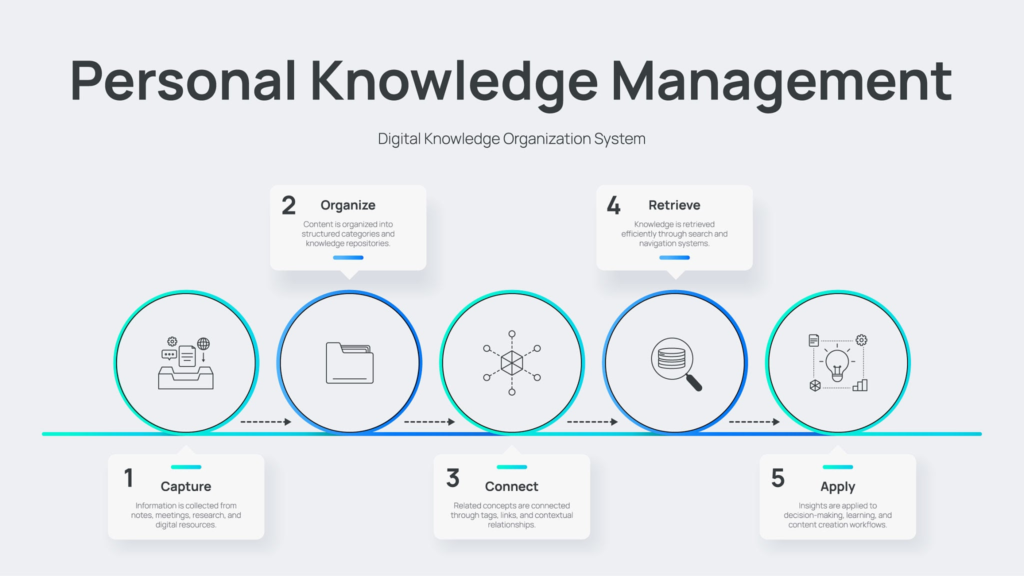
To thrive in a knowledge-driven economy, you cannot rely solely on biological memory. You need a system outside of your own head to capture, organize, and retrieve information on demand. This concept, popularized by productivity expert Tiago Forte, is known as building a “Second Brain”—a personal knowledge management (PKM) system. Today, with the integration of Artificial Intelligence (AI) and advanced digital tools, building a Second Brain has evolved from a simple digital filing cabinet into an active, thinking partner.
Here is a comprehensive guide to understanding, building, and leveraging a Second Brain to systematically improve your personal and professional growth.
The Psychological Foundation: Why You Need a Second Brain
Before diving into the tools and frameworks, it is essential to understand the cognitive psychology that makes a Second Brain so effective.
1. Cognitive Load Theory
In the 1980s, educational psychologist John Sweller developed Cognitive Load Theory, which explains that our working memory has a strictly limited capacity. We can only hold a few pieces of information in our minds at any given time. When you try to remember a grocery list, a project deadline, an insightful quote from a book, and an email you need to send, your working memory becomes overloaded. This cognitive overload leads to decision fatigue, anxiety, and a diminished capacity for deep, creative thinking.
2. The Zeigarnik Effect
Have you ever noticed how an unfinished task keeps popping into your head, but once you complete it, you forget about it entirely? This is the Zeigarnik Effect, named after psychologist Bluma Zeigarnik. Open loops (unresolved tasks or unrecorded ideas) consume background mental energy. Writing an idea down in a trusted digital system closes the loop, signaling to your brain that it no longer needs to actively track it.
3. The Extended Mind Thesis
Philosophers Andy Clark and David Chalmers proposed the Extended Mind Thesis, arguing that the human mind does not end at the skull. Instead, our cognitive processes extend into the environment through our tools. Just as a calculator is an extension of your mathematical reasoning, a digital note-taking system is a literal extension of your memory.
The Evolution: How AI Changes the Game
For years, building a Second Brain meant diligently organizing notes into folders and relying on keyword searches to find them later. It was static. You had to do all the heavy lifting of categorizing and retrieving.
The introduction of Large Language Models (LLMs) like OpenAI’s ChatGPT, Anthropic’s Claude, and AI-native note-taking tools has fundamentally transformed this landscape.
- From Keyword Search to Semantic Search: Traditional systems required you to search for the exact word you used in a note. AI enables semantic search, meaning it understands the context and meaning of your query. You can search for “that article about sleep and productivity,” and the AI will find it even if neither of those exact words were in the title.
- From Passive Storage to Active Synthesis: AI can act as a research assistant that reads your entire database of notes. You can ask your system, “Based on my journal entries and notes over the last six months, what are the recurring bottlenecks in my workflow?” and the AI will synthesize an answer derived entirely from your own past thoughts.
- Frictionless Capture: Voice-to-text models like Whisper allow you to dictate a rambling, unstructured thought while commuting, and AI will instantly transcribe, format, and summarize it into clear, bulleted action items.
The Core Framework: C.O.D.E.
The most effective way to structure your Second Brain is by following the CODE methodology (Capture, Organize, Distill, Express), modernized here to leverage AI tools.
1. Capture: Keep What Resonates
Your system is only as good as what you put into it. The goal of the capture phase is to save information quickly and effortlessly. Do not capture everything—only save ideas, quotes, or data that genuinely surprise you, inspire you, or are highly relevant to your current goals.
Digital Tools for Capturing:
- Readwise: An indispensable tool that automatically syncs your highlights from Kindle, Apple Books, Twitter, and web articles directly into your note-taking app.
- Web Clippers: Browser extensions (like Notion Web Clipper or Evernote Clipper) that save articles with one click.
- Voice Memos with AI: Apps like Oasis or AudioPen allow you to speak naturally. The AI transcribes your words and structures them into coherent notes, removing the friction of typing.
2. Organize: For Actionability, Not Categories
The biggest mistake people make is organizing their notes like a library—by broad topics like “Psychology,” “Marketing,” or “Health.” This makes information hard to find when you actually need it. Instead, organize by actionability.
Use the PARA method:
- Projects: Short-term efforts with a clear deadline (e.g., “Write Q3 Marketing Report,” “Plan trip to Japan”).
- Areas: Ongoing responsibilities with no end date (e.g., “Finances,” “Health,” “Team Management”).
- Resources: Topics of ongoing interest (e.g., “Web Design Inspiration,” “Leadership quotes”).
- Archives: Inactive items from the other three categories.
When saving a note, ask yourself: “In which specific project will this be most useful to me right now?”
3. Distill: Find the Essence
If you save a 5,000-word article, you are not going to reread it when you are in a rush to write a proposal. You must distill the information down to its core essence.
Progressive Summarization:
- Save the whole text.
- Bold the main points.
- Highlight the absolute most critical concepts.
- Write an “Executive Summary” at the top of the note in your own words.
The AI Advantage: You can automate the distillation process. When you clip an article, use an AI assistant to generate a 3-bullet-point summary and extract the key actionable takeaways, placing them at the top of the document.
4. Express: Show Your Work
A Second Brain is completely useless if it just becomes a digital hoarding ground. The ultimate purpose of knowledge management is knowledge output. You capture and organize information so you can express your ideas more effectively in the real world.
Expression can take many forms:
- Writing a newsletter or blog post.
- Creating a presentation for your executive team.
- Making a well-informed strategic decision.
- Having a deeper, more articulate conversation with a mentor.
When you sit down to create, you are no longer starting with a terrifying blank page. You are starting with a rich database of your own curated thoughts, quotes, and research.
Choosing Your Tech Stack
There is no single “perfect” app. The best tool is the one that aligns with the way your brain naturally works. Here are the main categories of modern digital tools:
| Tool Category | Best For | Popular Options |
| Architects | People who love structure, databases, and creating highly customized dashboards. | Notion, Coda |
| Gardeners | People who think in interconnected webs and want their notes to link together naturally. | Obsidian, Roam Research, Logseq |
| Librarians | People who want a fast, simple, folder-based system for rapid retrieval. | Apple Notes, Evernote, Bear |
| AI-Natives | People who want the tool to auto-tag, auto-organize, and surface relevant notes using AI. | Mem, Google NotebookLM, Notion AI |
Recommendation for Beginners: If you are just starting, do not overcomplicate your tech stack. Apple Notes or Google Keep is perfectly fine to build the habit. If you want a more robust workspace, Notion provides excellent structure, while Obsidian is the gold standard for linking concepts together (though it has a steeper learning curve).
Actionable Steps to Build Your System Today
Do not attempt to migrate years of old files into a new system. Start fresh from where you are today. Follow these steps:
- Select Your Central Hub: Choose ONE primary note-taking app. Do not split your notes across five different platforms.
- Set Up a “Quick Capture” Inbox: Create a default folder or page where all new notes, links, and ideas go immediately. This removes the friction of deciding where a note belongs in the moment.
- Establish a Weekly Review: A Second Brain requires maintenance. Set a recurring 30-minute calendar block every Friday afternoon. During this time, empty your “Inbox,” move notes into their appropriate PARA folders, and review your current active projects.
- Embrace AI Gradually: Start by using an AI transcriber for your voice notes. Once you are comfortable, experiment with using AI to summarize long articles you save.
Common Pitfalls to Avoid
As you embark on this journey, be mindful of these frequent stumbling blocks:
- The Collector’s Fallacy: This is the false belief that simply saving an article is the same as learning from it. Capturing is only step one; you must distill and review the information for it to become knowledge.
- Procrastination by Organization: Spending 10 hours perfectly color-coding your digital folders is not productive work—it is sophisticated procrastination. Keep your system as lightweight as possible. The system should serve you; you should not serve the system.
- Outsourcing Your Thinking entirely to AI: AI is an incredible synthesizer, but it does not have your unique life experiences, context, or intuition. Use AI to format, summarize, and connect data, but reserve the critical thinking, ethical judgments, and final creative synthesis for your biological brain.
Key Takeaways
- Your biological brain is meant for generating ideas, not storing them. A Second Brain relieves cognitive load.
- Organize your digital life by actionability (what project this serves) rather than broad subject categories.
- Do not just hoard information. Distill notes down to their core essence so your future self can easily understand them.
- The ultimate goal of personal knowledge management is output—turning what you consume into concrete actions, decisions, and creations.
- AI transforms a Second Brain from a passive storage system into an active thought partner through semantic search, auto-summarization, and frictionless voice capture.
By systematically offloading your memory to a trusted digital system, you free up your mental bandwidth. You transition from feeling constantly overwhelmed by the relentless flow of information to feeling a sense of clarity, focus, and quiet confidence. You stop reacting to the noise and start deliberately building your personal and professional growth.
Disclaimer: This article is intended for educational and informational purposes only. Personal growth is an ongoing journey, and results vary based on individual circumstances, consistent effort, and continuous learning.